
Make Electronic Sound
MES Arpeggiator
MES Arpeggiator
Couldn't load pickup availability
After checkout, you will receive an e-mail containing your download link and any relevant license details.
Share
MES Arpeggiator VST – Advanced MIDI Pattern Generator for Your DAW
MES Arpeggiator – A Creative MIDI Arpeggiator VST for Windows & Mac with Skippable Steps, Euclidean Rhythms & Deep Pattern Control.
MES Arpeggiator is designed to transform simple chord progressions into dynamic, evolving sequences—perfect for producers, composers, and sound designers. Whether you’re crafting cinematic soundscapes, dancefloor-ready grooves, or experimental textures, MES Arpeggiator gives you full control over every aspect of your MIDI output.
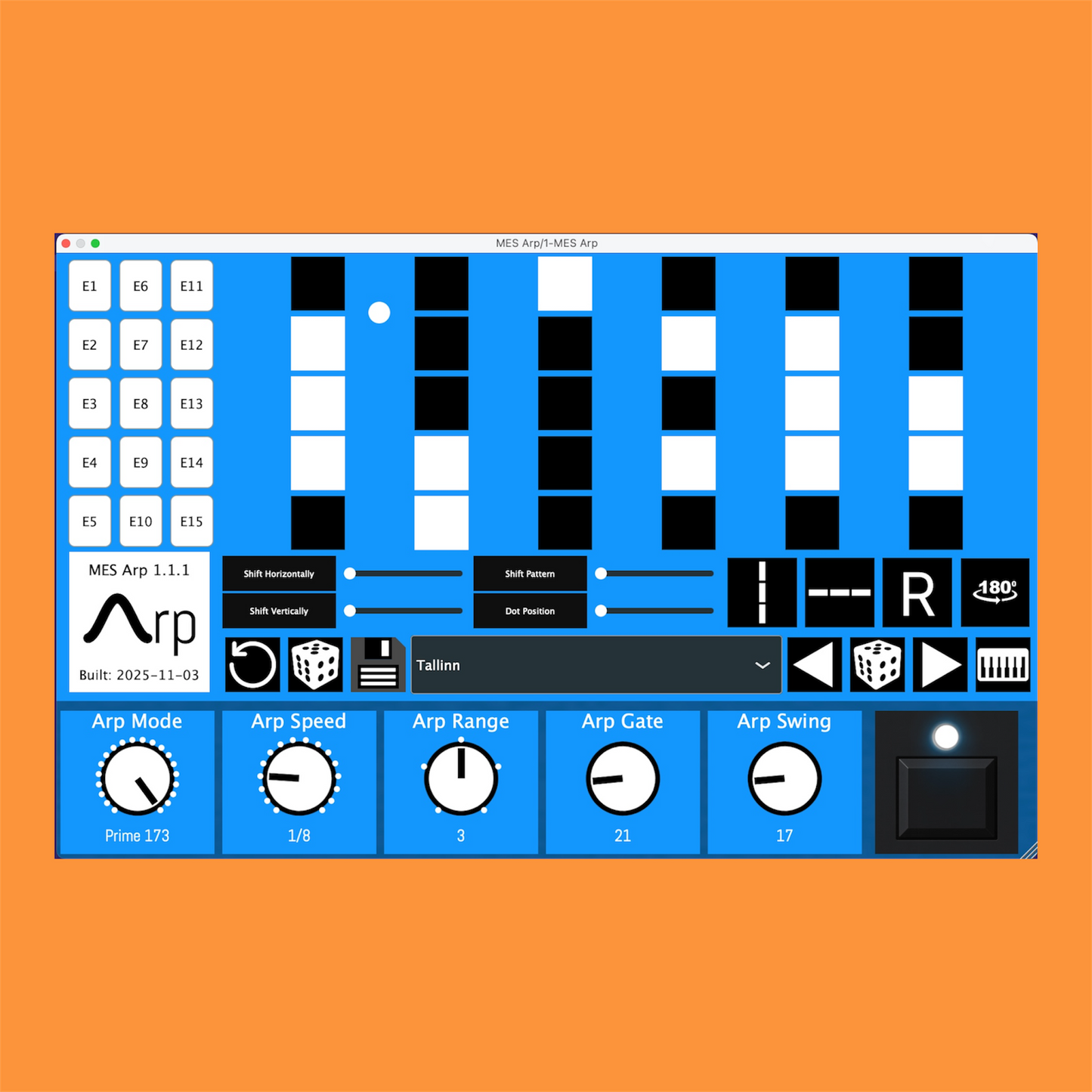
- Skippable Steps: Choose which steps are active or muted in real-time. Instantly reshape your pattern by toggling individual steps on or off.
- Euclidean Rhythms: Generate perfectly distributed pulses across your sequence. Dial in anything from simple 3-beat patterns to complex 7-pulse rhythms with just one parameter.
- Deep Pattern Control: Adjust octave ranges, direction (up/down/arbitrary), slip and translate entire patterns horizontally or vertically. Create bespoke patterns that evolve over time.
- Loop Controls: Focus any subsection with loop start/end/length—great for variations, fills, and evolving grooves.
- Seamless DAW Integration: Works “out of the box” in Ableton Live, FL Studio, Cubase, Reaper and Bitwig Studio. Automatically syncs to host BPM, time signature, and transport.
- Advanced Note Timing: Choose from 1/1 to 1/64 note durations, dotted and triplet subdivisions. Every step is quantized to your project’s grid for rock-solid timing.
- Gate & Swing: Shape note length and groove in real time. Set Gate % for note length and dial musical Swing without interrupting playback.
- Octave Range Selection: From a single-octave arpeggiation to multi-octave runs—cover up to five octaves with the click of a dropdown.
- Randomization & Presets: Instantly generate new patterns or recall previously saved presets. Experiment without losing your favorite groove.
- Visual Feedback: Step-view grid highlights active steps, current playhead position, and reflection/rotation markers. Know exactly where you are in the sequence at a glance.
Every aspect of MES Arpeggiator is crafted to inspire creativity and workflow speed. Turn a static chord into a living, breathing sequence that evolves over time. With intuitive controls, real-time performance tweaks, and a lightweight, low-latency engine, you’ll spend less time programming and more time composing.
System Requirements
macOS (Mac):
- macOS 10.11 (El Capitan) and later (64-bit only; Intel and Apple Silicon)
- VST3 (64-bit)
Windows (PC):
- Windows 8, 10, 11 (64-bit only)
- VST3 (64-bit)
Formats & Hosting:
- MES Arp is not a standalone application; it requires a VST3-compatible DAW host.
- Fully native on Apple Silicon (M1/M2) and Intel-based Macs.
Required DAW Versions:
Ableton
Bitwig
Cubase
FL Studio
Reaper
CPU & RAM (Minimum):
- Intel Core i3 or AMD Ryzen 3 (or Apple M1 equivalent)
- 4 GB RAM
CPU & RAM (Recommended):
- Intel Core i5 (8th Gen or later) / AMD Ryzen 5 (2nd Gen or later) / Apple M1
- 8 GB RAM (16 GB+ for large projects)
Note: MES Arpeggiator does not produce sound on its own. You must route its MIDI output to a virtual instrument, drum machine, or hardware synth for audio playback. See below for the 5 most popular DAWs.
How to Use the MES Arpeggiator
1. Insert the Plugin
Load MES Arpeggiator on any MIDI track in your DAW. Route the MIDI output of Arpeggiator to a virtual instrument, hardware synth, or drum machine. The plugin will automatically follow your host’s BPM and transport.
2. Play or Program Chords/Notes
Trigger one or more notes from your MIDI keyboard or draw in notes on your DAW’s piano roll. MES Arpeggiator captures incoming notes and builds an internal note pool for arpeggiation.
3. Choose an Arp Mode & Speed
Discover a world of arpeggiation beyond the ordinary: choose classic Up, Up-Random, Down, Down-Random, or Pure Random—then dive into MES’s signature Prime modes (131, 137, 139, 149, 151, 157, 163, 167, 173). Each prime mode cycles through all held notes in a unique, repeatable sequence you won’t get from any classic pattern. Finally, lock in your groove by selecting any sync value (¼, ⅛T, and more) to keep everything tight with your track.
4. Activate or Mute Steps
Click on grid buttons to toggle individual steps on and off. Muted steps will not trigger a note, allowing you to create rests, syncopation, or stutter effects.
5. Adjust Octave Range & Direction
Use the octave-range dropdown to span 1, 2, 3, 4, or 5 octaves.
6. Apply Euclidean Patterns
Set a Euclidean parameter (E-value) to evenly distribute pulses across the grid. Watch as the plugin auto-generates a groove that fills out exactly the number of active beats you request.
7. Slip, Translate & Reflect
Use sliders to shift your entire pattern horizontally or vertically by a specified number of steps. Toggle reflection buttons to flip your sequence along horizontal or vertical axes—perfect for mirror-image variations.
8. Save & Recall Presets
Click the Save button to store your current step-states, speed, and octave settings as a named preset. Use the Pattern Chooser dropdown to quickly switch between saved grooves.
Practical Examples & Tips
Layered Basslines
Create a driving bass-sequencer by arpeggiating a two-note bass chord. Mute alternating steps (e.g., steps 2 & 4) for a bouncing groove. Add a 3-octave range and 1/8D sync to fill out the low end without muddying the mix.
Melodic Stabs & Leads
Use a 1-octave setting with Up mode for classic “house” arpeggio stabs. Toggle off every third step to insert rhythmic rests, or apply a 1/16T triplet setting for a swung, syncopated feel.
Ambient Textures
Dial in a 4-octave range with random direction. Activate every fifth step to produce sparse, evolving patterns.
Drum-Pattern Variations
Route your drum-rack MIDI output through MES Arpeggiator. Use skippable steps to mute hi-hat hits selectively. Combine with triplet timings (1/8T) to add unexpected ghost patterns underneath your kick/snare foundation.
Documentation